
Managing Ad Density and User Experience: Calculating the Optimal Ad-to-Content Ratio
Chromium's built-in ad filtering engine and Google Ad Manager (GAM) policy crawlers do not evaluate ad density against total document scroll height

Chromium's built-in ad filtering engine and Google Ad Manager (GAM) policy crawlers do not evaluate ad density against total document scroll height (document.documentElement.scrollHeight); instead, they calculate the vertical pixel sum of all rendered ad containers divided exclusively by the vertical height of the semantic main content container. When a publisher template hardcodes six inline ad slots into a short breaking-news article, the resulting pixel ratio routinely breaches browser enforcement thresholds, triggering origin-wide ad blocking in Chrome and immediate AdX policy restrictions.
Beyond regulatory enforcement, excessive slot density degrades auction mechanics at the protocol level. Over-saturating the DOM with simultaneous Prebid.js 11.x and Google Publisher Tag (GPT) ad units creates main-thread contention during page hydration, delays VAST and banner creative rendering, and depresses domain-wide Active View metrics. Tier-1 DSPs ingesting historical viewability signals via OpenRTB 2.6 imp.metric objects systematically apply aggressive bid shading or QPS throttling to supply paths that exhibit low viewability and high layout churn.
Engineering an optimal ad-to-content ratio requires replacing static CMS slot placements with deterministic, viewport-aware injection logic. At Sky Boosts, our publisher solutions architecture treats vertical pixel allocation as a finite runtime budget, balancing Prebid auction density and GAM yield against strict user experience and inventory quality thresholds.
How the 30% Mobile (and 50% Desktop) Viewport Density Rules Are Measured
According to the Coalition for Better Ads standards, mobile web ad density is prohibited from exceeding 30% of the vertical height of the main content portion of a page, while standard desktop web environments are capped at a 50% vertical ad density threshold. These percentages are not visual estimates of screen coverage at a single moment in time; they represent a cumulative vertical linear measurement across the primary editorial body.
Mathematically, automated compliance auditors evaluate the following ratio after the page lifecycle settles and lazy-loaded slots within the article track have initialized:
$$\text{Ad Density Ratio} = \frac{\sum_{i=1}^{n} H_{\text{ad}, i}}{H_{\text{main_content}}}$$
In this formula, $H_{\text{ad}, i}$ is the rendered vertical height in CSS pixels of each distinct ad unit intersecting or overlaying the main content column, and $H_{\text{main_content}}$ is the vertical height in CSS pixels of the primary editorial container. Understanding how specific ad behaviors affect the numerator is essential for AdOps teams configuring multi-size auctions:
- In-Content Multi-Size Variance: If a mobile inline slot is configured in Prebid.js and GPT to accept
[300, 250],[336, 280], and[300, 600], the compliance risk scales with the winning creative size. A single300x600Half Page unit consumes 600 vertical pixels, which is equivalent to the vertical footprint of twelve320x50mobile banners. Optimizing banner formats requires restricting high-aspect-ratio sizes on shorter articles where a single 600-pixel creative can consume the entire density budget. - Sticky and Anchor Units: A sticky bottom anchor (
320x50or320x100) that remains pinned to the viewport during scroll is not multiplied by the number of viewports the user scrolls through. Its vertical height (including any close-button tab or padding wrapper) is added once to the cumulative ad height numerator. - In-View Ad Refresh: Refreshing an existing
300x250slot after 30 seconds of continuous MRC viewability replaces the creative inside the same DOM container. Because the vertical footprint remains 250 pixels (assuming size consistency), a compliant refresh cycle does not increase the physical ad density percentage, whereas injecting a new DOM slot upon scroll directly inflates the numerator. - Container Padding and Labels: Compliance crawlers measure the outer bounding box of the ad wrapper, meaning a 250-pixel creative inside a wrapper with 24 pixels of vertical margin and a 16-pixel "Advertisement" disclosure label contributes 290 pixels to the density calculation.
The Special 30% Desktop Cap When Combined with a Sticky Video Ad
A frequent production failure occurs when publishers assume desktop layouts always enjoy a 50% vertical ad density allowance. Under the Coalition for Better Ads standards, desktop ad density is restricted to no more than 30% whenever the page deploys a sticky video ad.
In modern programmatic stacks, a sticky video ad typically initiates as an in-article instream or outstream VAST 4.3 player (640x360 or 480x270). When the user scrolls past the initial player container, an IntersectionObserver callback mutates the player container's CSS to position: fixed, pinning a minimized 320x180 or 400x225 video viewport to the bottom-right corner of the desktop screen.
When an AdOps team layers this sticky video behavior onto a desktop template originally engineered for a 45% display density ceiling (for example, combining a 970x250 top billboard, two 300x600 right-rail units, and multiple 728x90 inline slots), the presence of the pinned video container immediately lowers the legal threshold from 50% to 30%. Automated Google policy scanners detect the detached position: fixed video element alongside the display wrappers and flag the URL for violating Better Ads Experiences. To prevent this failure mode, the ad tag controller must check whether the floating video player feature is active on the current template and dynamically clamp the display slot budget below the 30% ceiling.
Measuring Cumulative Ad Height vs. Main Content Container Height
The most common telemetry error in publisher ad stacks is measuring ad height against document.body.offsetHeight. In a standard mobile web publishing template, the full document height often exceeds 5,500 pixels, but more than half of that vertical space consists of non-editorial chrome: site navigation headers, breaking-news tickers, author bio cards, third-party recirculation grids, comment threads, and mega-footers. Compliance engines strip all of those peripheral DOM nodes out of the denominator, isolating only the primary <article> body.
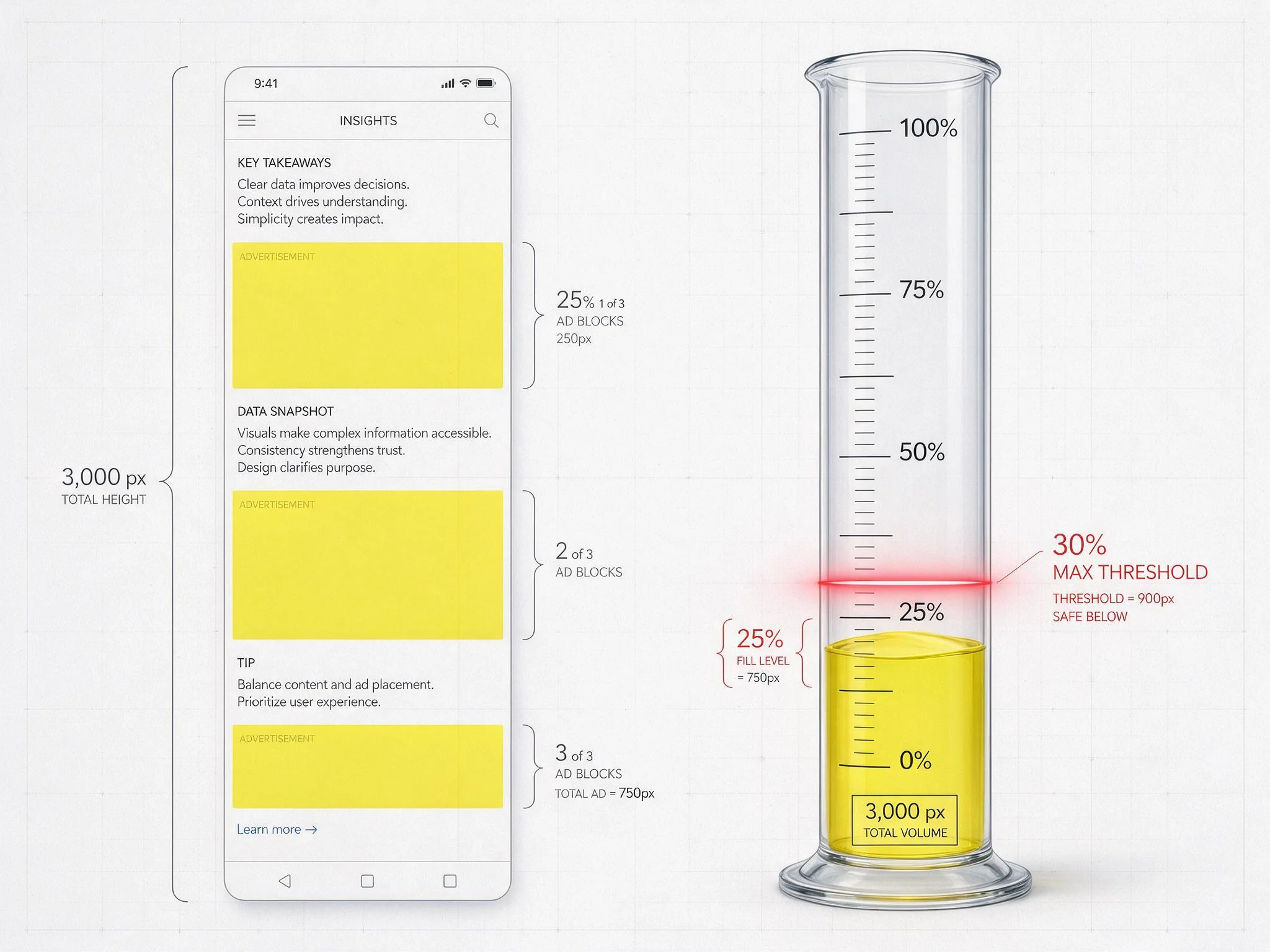
Consider a concrete mobile production scenario on a 390x844 viewport. A journalist publishes a 400-word market update that renders inside the <article class="post-body"> container at an exact vertical height of 1,500 pixels ($H_{\text{main_content}} = 1500\text{px}$). Below the article, a recirculation widget and site footer add another 2,200 pixels, bringing the total document height to 3,700 pixels.
If the publisher calculates density against the 3,700-pixel document height, they might mistakenly assume they have a 30% budget of 1,110 pixels. In reality, the 30% cap applies strictly to the 1,500-pixel article body, yielding a maximum allowable ad height budget of 450 pixels ($1500 \times 0.30 = 450\text{px}$). If the static page template injects:
- One top-of-article
300x250unit (250px creative + 20px label/wrapper = 270px) - One mid-article
300x250unit (270px) - One bottom sticky
320x50anchor unit (50px)
The cumulative ad height reaches 590 pixels. Evaluated against the 1,500-pixel main content container, the actual ad density is 39.3% ($590 / 1500$), placing the page in violation of the 30% mobile standard despite only running three ad slots.
Furthermore, reserving static CSS min-height placeholders to prevent Cumulative Layout Shift (CLS) introduces a secondary measurement nuance. If a publisher reserves a min-height: 600px wrapper to accommodate a potential 300x600 winner, but the auction clears a 300x250 creative and leaves 350 pixels of blank whitespace inside the ad container, layout auditors may evaluate the uncollapsed container height unless the wrapper collapses cleanly outside the active viewport or the slot sizes are constrained prior to the auction.
Session Depth Multiplier: Why Fewer Ads Per Page Often Yield Higher RPMs per Session
Reducing ad density on over-monetized templates rarely causes the linear revenue drop publishers fear; instead, it frequently expands total yield per user session. Programmatic revenue is governed by Session RPM (Revenue Per Thousand Sessions) rather than isolated Page RPM:
$$\text{Session RPM} = \text{Pageviews per Session} \times \text{Ads per Page} \times \text{Fill Rate} \times \text{Clearing eCPM}$$
When a publisher crams eight or nine ad slots into a standard mobile article, three compounding technical mechanisms depress the right side of that equation:
- Bid Shading and SPO Filtering: Supply Path Optimization (SPO) algorithms operated by tier-1 DSPs segment publisher inventory into viewability tiers based on historical Active View and Open Measurement (OM) signals. Slots injected tightly together force users to scroll rapidly past ads to read fragmented sentences, driving per-slot viewability down into the 35% to 45% range. Once a placement falls below the 50% viewability threshold, DSP bidding models apply steep bid shading (often discounting bids by 30% to 60%) or exclude the ad unit ID from high-value PMP and programmatic guaranteed deals entirely.
- Browser Main-Thread Saturation: Executing Prebid.js 11.x header bidding across ten simultaneous slots generates dozens of parallel XHR/Fetch requests, JSON parsing tasks, and iframe creation operations. On mid-tier mobile devices, this CPU contention delays the GPT auction invocation and causes late-responding DSPs to miss the auction timeout curve, directly reducing bid density and second-price/first-price clearing pressure.
- Session Truncation: High cognitive load and scroll fatigue increase immediate bounce rates. A user who exits after 1.1 pages generates far less monetizable attention than a user who navigates through 2.4 pages per session.
| Metric | Over-Saturated Layout (8 Slots/Page) | Density-Calibrated Layout (4 Slots/Page) | Net Yield Variance |
|---|---|---|---|
| Vertical Ad Density (Mobile) | 38.5% (Non-Compliant) | 22.0% (Compliant) | -16.5% Density |
| Average Active View Viewability | 44% | 76% | +32% Viewability |
| Prebid Timeout Rate | 18.4% | 4.2% | -14.2% Timeouts |
| Average Clearing eCPM | $1.15 | $2.45 | +113% eCPM |
| Pageviews per Session | 1.25 | 2.15 | +72% Session Depth |
| Effective Session RPM | $11.50 | $21.07 | +83.2% Revenue |
Publishers evaluating layout restructuring can model these exact viewability, session depth, and eCPM elasticity variables against their own analytics to project working capital gains across Net-30 and Net-60 payment cycles. By pruning low-viewability slots, the remaining placements cross the 70% viewability threshold required by premium brand-safe demand, more than doubling clearing eCPMs while simultaneously lifting pages per session.
Dynamic Slot Injection Based on Article Word Count and Paragraph Spacing
To guarantee compliance with the 30% mobile and 50% desktop ceilings without sacrificing revenue on long-form journalism, publishers must replace hardcoded CMS ad tags with a dynamic DOM slot injector. The script below measures the rendered height of the semantic <article> container, accounts for any fixed anchor or sticky video units, applies a safety buffer (targeting a maximum 25% density on mobile and 27% on desktop with sticky video), and dynamically injects Prebid.js 11.x and GPT slots only when sufficient vertical content height and paragraph spacing exist.
(function initDensityAwareAdInjector() {
  const articleEl = document.querySelector('article.main-content');
  if (!articleEl) return;

  const isMobile = window.matchMedia('(max-width: 767px)').matches;
  const hasStickyVideo = Boolean(document.querySelector('.sticky-video-player'));

  // Enforce Coalition for Better Ads thresholds with a 4-5% safety buffer
  const maxDensityRatio = isMobile ? 0.25 : (hasStickyVideo ? 0.26 : 0.44);
  const contentHeight = articleEl.getBoundingClientRect().height;
  const maxAllowedAdPixels = Math.floor(contentHeight * maxDensityRatio);

  // Account for persistent anchor/sticky units already active on the page
  const stickyAnchorHeight = isMobile ? 60 : 0; // 320x50 + 10px wrapper
  const stickyVideoHeight = (!isMobile && hasStickyVideo) ? 225 : 0;
  let allocatedAdPixels = stickyAnchorHeight + stickyVideoHeight;

  const paragraphs = Array.from(articleEl.querySelectorAll('p'));
  const minParagraphGapPx = isMobile ? 420 : 500;
  let lastInjectedY = articleEl.getBoundingClientRect().top + window.scrollY;
  let slotIndex = 1;

  const dynamicAdUnits = [];
  const gptSlots = [];

  window.googletag = window.googletag || { cmd: [] };
  window.pbjs = window.pbjs || { que: [] };

  paragraphs.forEach((p, index) => {
    // Skip lead paragraphs and ensure content follows the ad
    if (index < 2 || index >= paragraphs.length - 2) return;

    const rect = p.getBoundingClientRect();
    const currentY = rect.bottom + window.scrollY;
    const distanceSinceLastAd = currentY - lastInjectedY;

    if (distanceSinceLastAd < minParagraphGapPx) return;

    const remainingBudget = maxAllowedAdPixels - allocatedAdPixels;
    let allowedSizes = [];
    let reservedHeight = 0;

    // Select multi-size arrays strictly within remaining vertical pixel budget
    if (remainingBudget >= 624 && !isMobile) {
      allowedSizes = [[300, 600], [300, 250], [336, 280]];
      reservedHeight = 624; // 600px creative + 24px label/margin
    } else if (remainingBudget >= 274) {
      allowedSizes = isMobile ? [[300, 250], [320, 100], [320, 50]] : [[728, 90], [300, 250]];
      reservedHeight = 274; // 250px max creative + 24px label/margin
    } else if (remainingBudget >= 124 && isMobile) {
      allowedSizes = [[320, 100], [320, 50]];
      reservedHeight = 124;
    } else {
      return; // Density budget exhausted; halt further slot injection
    }

    const slotId = `skyboosts-inline-ad-${slotIndex++}`;
    const wrapper = document.createElement('div');
    wrapper.className = 'sb-ad-wrapper';
    wrapper.style.minHeight = `${reservedHeight}px`;

    const adDiv = document.createElement('div');
    adDiv.id = slotId;
    wrapper.appendChild(adDiv);
    p.parentNode.insertBefore(wrapper, p.nextSibling);

    allocatedAdPixels += reservedHeight;
    lastInjectedY = currentY + reservedHeight;

    dynamicAdUnits.push({
      code: slotId,
      mediaTypes: { banner: { sizes: allowedSizes } },
      bids: [
        { bidder: 'skyboosts', params: { placementId: `inline_${slotIndex}`, floor: 1.20 } }
      ]
    });

    googletag.cmd.push(() => {
      const slot = googletag.defineSlot('/21800000000/article_inline', allowedSizes, slotId)
        .addService(googletag.pubads());
      gptSlots.push(slot);
    });
  });

  if (dynamicAdUnits.length > 0) {
    pbjs.que.push(() => {
      pbjs.addAdUnits(dynamicAdUnits);
      pbjs.requestBids({
        adUnitCodes: dynamicAdUnits.map(u => u.code),
        timeout: 1200,
        bidsBackHandler: () => {
          pbjs.setTargetingForGPTAsync(dynamicAdUnits.map(u => u.code));
          googletag.cmd.push(() => googletag.pubads().refresh(gptSlots));
        }
      });
    });
  }
})();
Notice how this architecture couples multi-size eligibility directly to the remaining pixel budget (remainingBudget). If an article has 300 pixels of remaining vertical budget before reaching the 25% mobile safety threshold, the script automatically strips [300, 600] from the Prebid.js mediaTypes.banner.sizes array and the GPT defineSlot definition, guaranteeing that a high-CPM Half Page bid cannot push the page into a compliance violation.
From an AdOps engineering standpoint, your immediate implementation takeaway is to instrument a slotRenderEnded listener in GPT that logs the actual rendered creative heights against <article> height via navigator.sendBeacon on visibilitychange. Auditing the 95th percentile (p95) of real-user ad density across mobile and desktop templates allows your engineering team to catch edge-case layout violations on short-form articles before automated browser filters or ad exchange policy crawlers penalize your domain.