
CTV App Certification and Monetization on Roku, Samsung Tizen, and LG webOS: Platform-Specific Requirements
When a Server-Side Ad Insertion (SSAI) stitcher dispatches an OpenRTB 2.6 bid request on behalf of a Connected TV (CTV) client without forwarding the exact
When a Server-Side Ad Insertion (SSAI) stitcher dispatches an OpenRTB 2.6 bid request on behalf of a Connected TV (CTV) client without forwarding the exact hardware-level User-Agent header or the platform-native Resettable Device Identifier (IFA), tier-1 DSPs either throttle queries per second (QPS), apply aggressive bid shading, or drop the impression entirely during pre-bid invalid traffic (IVT) verification. Beyond immediate yield degradation in the programmatic auction, failing to implement operating-system-mandated advertising libraries, privacy opt-out checks, and hardware decoder lifecycle rules triggers automatic rejection during app store certification reviews across Roku OS, Samsung Tizen, and LG webOS.
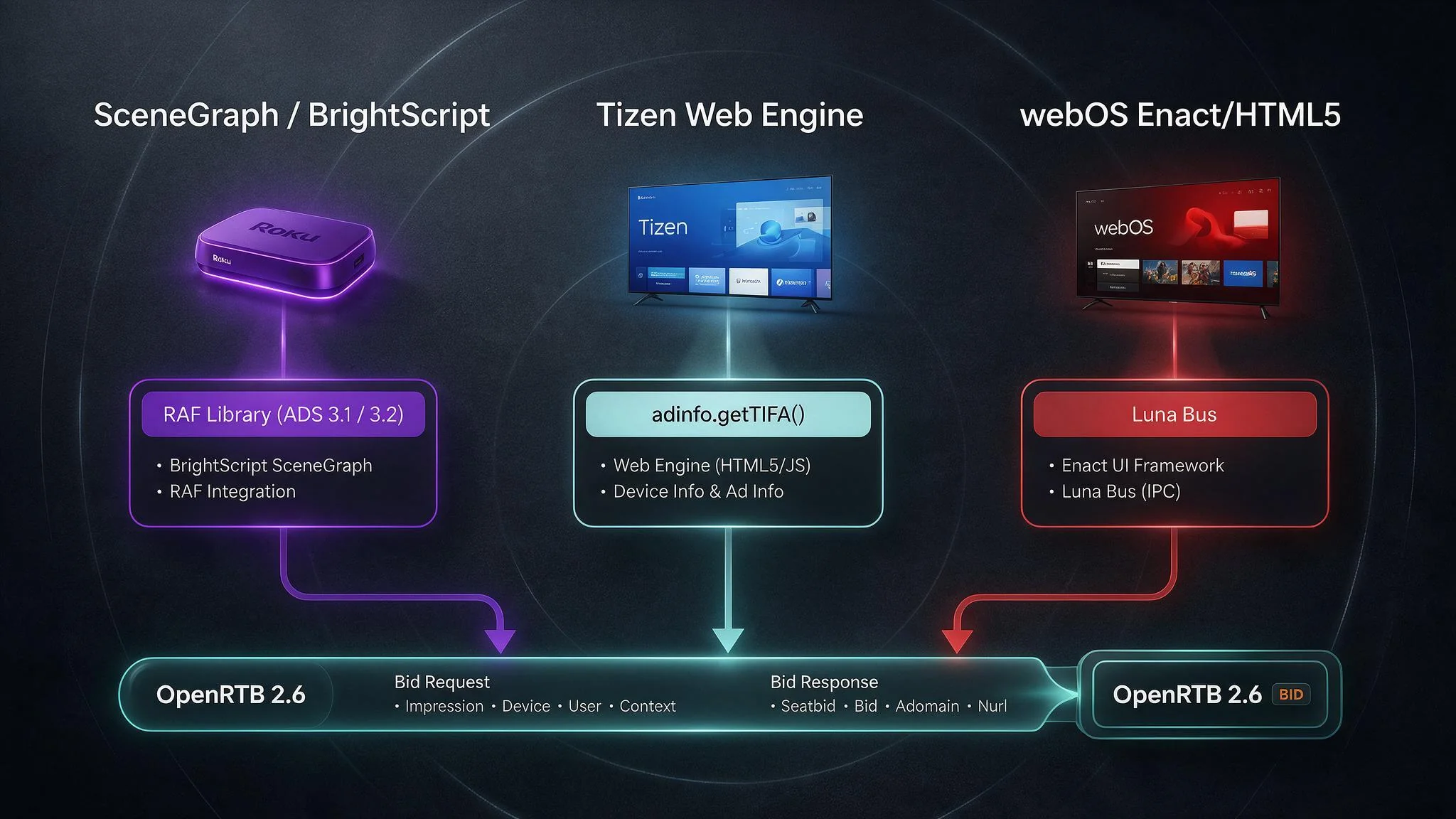
Engineering teams building cross-platform CTV applications frequently underestimate the divergence between living-room operating systems. While mobile development coalesced around iOS and Android years ago, smart TV monetization spans fundamentally incompatible runtime architectures. Roku OS isolates application logic inside a proprietary BrightScript virtual machine paired with SceneGraph XML render trees, prohibiting standard HTML5 DOM manipulation or JavaScript VAST SDKs. Conversely, Samsung Tizen and LG webOS execute packaged web applications inside customized Chromium engines, yet each platform exposes device identity through proprietary native bridges (webapis.adinfo on Tizen versus asynchronous Luna Service Bus calls on webOS) and enforces rigid hardware memory ceilings on entry-level television silicon.
Passing certification on the first submission while maximizing programmatic clearing prices requires engineering and AdOps teams to align client-side telemetry directly with sell-side supply path optimization (SPO) standards. When publishers connect their inventory to a unified CTV monetization platform, every upstream ad request must carry validated app store bundle identifiers, unmodified device headers, deterministic limit-ad-tracking (lmt) signals, and VAST 4.3 quartile tracking parity across both Client-Side Ad Insertion (CSAI) and SSAI workflows.
Roku Channel Monetization: RAF (Roku Advertising Framework) Mandate and Certification Rules
Roku OS enforces the strictest platform-level advertising governance in the CTV ecosystem. Every monetized application distributed through the Roku Channel Store must declare bs_libs_required=roku_ads_lib inside its root manifest file and execute all ad lifecycle orchestration through the built-in Roku Advertising Framework (RAF) library. As detailed in Roku's official documentation on integrating the Roku Advertising Framework, monetized channels are required to load the native Roku_Ads() library; for SSAI streams, applications must pass the Roku ID for Advertising (RIDA) and the unmodified Roku-generated device User-Agent (ROKU_ADS_USER_AGENT) from the client to the stitcher, and any custom ad parsing or rendering implementation requires explicit written approval from adsupport@roku.com. Channels that attempt to parse VAST XML responses independently or fire tracking pixels outside RAF without prior authorization fail automated static analysis and manual store certification.
Architecturally, SceneGraph applications are multi-threaded environments where UI rendering runs on the main render thread while network I/O and blocking operations must execute inside a dedicated Task node (roSGNode subtype Task). Because Roku_Ads() performs synchronous socket communication, VAST XML parsing, and periodic beacon dispatching, instantiating RAF on the main SceneGraph render thread causes immediate execution faults. Engineering teams must encapsulate all RAF calls inside a dedicated Ad Task thread that observes the primary Video node state and shares focus with the UI tree during interactive ad pods.
Whether a publisher implements CSAI via raf.getAds() and raf.showAds() or stitches ad segments upstream in the cloud via HLS (.m3u8) and DASH (.mpd) manifests, RAF remains mandatory. In an SSAI architecture, the client application does not download raw VAST XML directly from the ad server; instead, the SSAI stitcher returns a unified media manifest alongside a sidecar metadata payload detailing pod timing and tracking beacons. Even in this server-stitched topology, the BrightScript client must pass the stitched ad metadata into raf.stitchedAdsInit() and invoke raf.stitchedAdHandledEvent() inside the player loop so Roku OS can verify ad rendering, enforce platform-wide frequency caps, and validate impression beacons.
Passing ROKU_ADS_APP_ID (ADS 3.1) and Unmodified ROKU_ADS_USER_AGENT (ADS 3.2) in SSAI Calls
During store submission, automated test harnesses inspect outbound network traffic generated by the channel and its configured SSAI stitcher against Roku's official ad certification requirements, which stipulate under rules ADS 3.1 and ADS 3.2 that applications must pass their Roku channel ID (retrieved via roChannelInfo.getId() or populated through the ROKU_ADS_APP_ID macro) and the unmodified Roku device User-Agent in all server-side ad requests. These two requirements represent the single most common point of failure for CTV publishers migrating to server-side ad insertion.
Under rule ADS 3.1, every ad request originating from a Roku device must identify the originating channel using its official numeric Roku Channel Store ID. When an application runs in side-loaded developer mode during QA, CreateObject("roAppInfo").GetID() and CreateObject("roChannelInfo").getId() return the literal string "dev". A frequent production defect occurs when engineers hardcode a staging identifier or allow "dev" to leak into production SSAI templates, causing DSPs to reject the inventory as unverified or mismatched against the publisher's app-ads.txt file. In production builds, the channel must dynamically inject the live store ID into the SSAI session initialization request so the stitcher can populate both the ad server URL macro and the OpenRTB 2.6 app.bundle and app.storeid fields.
Under rule ADS 3.2, the stitcher cannot substitute a generic server User-Agent (such as Go-http-client/1.1 or Amazon CloudFront) when querying downstream ad servers, SSPs, or OpenRTB endpoints. The Roku client must extract its native firmware User-Agent string (formatted like Roku/DVP-12.5 (12.5.0.4178-88)) alongside the RIDA (roDeviceInfo.GetRIDA()) and the limit-ad-tracking flag (roDeviceInfo.IsRIDADisabled()), passing these parameters to the SSAI session endpoint. The SSAI platform must then forward the exact, byte-for-byte ROKU_ADS_USER_AGENT string inside the HTTP User-Agent and X-Device-User-Agent headers, as well as the OpenRTB device.ua string, on every upstream bid request and downstream VAST tracking beacon. Modifying, truncating, or normalizing this string triggers certification failure under ADS 3.2 and causes HUMAN and Pixalate pre-bid filters to flag the traffic as non-human data-center spoofing.
Library "Roku_Ads.brs"

sub RunSsaiAdTask()
    raf = Roku_Ads()
    raf.enableAdMeasurements(true)

    appInfo = CreateObject("roAppInfo")
    devInfo = CreateObject("roDeviceInfo")

    channelId = appInfo.GetID()
    isLat = devInfo.IsRIDADisabled()
    rida = devInfo.GetRIDA()

    ' Construct SSAI session initialization URL using native RAF macros
    ' RAF automatically resolves ROKU_ADS_APP_ID and ROKU_ADS_USER_AGENT
    ssaiInitUrl = "https://ssai.skyboosts.com/v1/session/init"
    ssaiInitUrl = ssaiInitUrl + "?app_id=ROKU_ADS_APP_ID"
    ssaiInitUrl = ssaiInitUrl + "&ifa=ROKU_ADS_TRACKING_ID"
    ssaiInitUrl = ssaiInitUrl + "&lmt=ROKU_ADS_LIMIT_TRACKING"
    ssaiInitUrl = ssaiInitUrl + "&ua=ROKU_ADS_USER_AGENT"

    ' Register URL with RAF parameter replacement engine
    raf.setAdUrl(ssaiInitUrl)
    adPods = raf.getAds()

    if adPods <> invalid and adPods.Count() > 0 then
        raf.stitchedAdsInit(adPods)
    end if
end sub
Custom Ad Parsing/Rendering Approval and fireTrackingEvents() in BrightScript
Certain advanced broadcast architectures, such as live linear FAST channels utilizing custom HLS EXT-X-DATERANGE SCTE-35 markers or proprietary multi-angle sports players, cannot use the standard raf.stitchedAdsInit() player wrapper without breaking custom timeline synchronization. As mandated by Roku policy, publishers cannot deploy custom ad parsing or rendering logic into the Channel Store without first submitting their architectural design and justification to adsupport@roku.com and receiving explicit written approval.
Even when written approval is granted for custom ad parsing, the application is strictly prohibited from firing VAST impression and quartile tracking URLs directly via raw roUrlTransfer objects. Instead, the BrightScript engineer must translate the SSAI stitcher's JSON tracking payload into a RAF-compliant adStructure associative array and pass that structure into raf.fireTrackingEvents(adStructure, eventContext) as playback progresses.
sub TrackCustomSsaiPodLifecycle(adStructure as Object, currentPos as Float)
    raf = Roku_Ads()

    ' Fire impression beacon when ad segment begins rendering
    if currentPos >= adStructure.renderTime and not adStructure.impFired then
        raf.fireTrackingEvents(adStructure, {type: "Impression"})
        adStructure.impFired = true
    end if

    ' Fire continuous time-progress events so RAF triggers quartiles (25%, 50%, 75%, 100%)
    raf.fireTrackingEvents(adStructure, {
        type: "Position",
        time: currentPos - adStructure.renderTime
    })
end sub
Routing custom SSAI beacons through raf.fireTrackingEvents() ensures that RAF injects mandatory cryptographic validation headers, deduplicates quartile pings if the viewer scrubs the timeline, and records telemetry required by Roku's automated certification suite. Publishers seeking to accelerate this integration without maintaining bespoke BrightScript state machines can deploy pre-validated Roku, tvOS, and smart TV SDKs that encapsulate RAF threading, macro hydration, and beacon verification.
Samsung Tizen TV: Ad API Integration, TIFA Retrieval, and Memory Limits
Samsung Tizen OS powers the largest global footprint of smart televisions through a web-centric runtime architecture. Tizen applications are packaged as signed Widget archives (.wgt) containing HTML5, CSS, JavaScript, and a root config.xml manifest that controls access to native device APIs exposed via the global tizen and webapis objects. Unlike Roku's closed BrightScript environment, Tizen allows client-side JavaScript ad integrations and SSAI session controllers, provided the application adheres to Samsung Seller Office security privileges and strict hardware memory boundaries.
The foundational requirement for monetizing a Samsung Tizen app is retrieving the Tizen Identifier for Advertising (TIFA) and the user's Limit Ad Tracking (LAT) preference. Before any JavaScript code can query the identity subsystem, the application's config.xml file must declare the explicit adinfo and productinfo privileges:
<tizen:privilege name="http://developer.samsung.com/privilege/adinfo"/>
<tizen:privilege name="http://developer.samsung.com/privilege/productinfo"/>
<tizen:privilege name="http://tizen.org/privilege/internet"/>
If a build is packaged without the http://developer.samsung.com/privilege/adinfo declaration, calling webapis.adinfo.getTIFA() throws a runtime SecurityError exception. When engineers fail to catch or log this exception Properly, the application silently defaults to sending empty or all-zero device.ifa strings (00000000-0000-0000-0000-000000000000) in OpenRTB 2.6 requests, reducing programmatic CPMs by 60% to 75% due to the inability of DSPs to perform cross-device attribution or frequency capping.
In addition to extracting the raw TIFA string, Tizen certification requires strict enforcement of privacy opt-out signals. Developers must query webapis.adinfo.isPrivacyNoticeAccepted() (or webapis.adinfo.isLATEnabled() depending on the target Tizen firmware generation) before hydrating the ad request payload. When a user opts out of personalized advertising, the application must set the OpenRTB device.lmt integer to 1 and replace the persistent hardware TIFA with a rotating, session-scoped UUID (device.ext.ifa_type = "sessionid") so sell-side platforms can enforce single-session frequency caps without violating user privacy.
function buildTizenOpenRtbDeviceObject() {
  let tifa = "";
  let lmt = 0;
  let ifaType = "tifa";
  let model = "Samsung-SmartTV";

  try {
    if (window.webapis && window.webapis.productinfo) {
      model = window.webapis.productinfo.getRealModel() || model;
    }
    if (window.webapis && window.webapis.adinfo) {
      const privacyAccepted = window.webapis.adinfo.isPrivacyNoticeAccepted();
      if (!privacyAccepted) {
        lmt = 1;
        ifaType = "sessionid";
        tifa = window.crypto.randomUUID();
      } else {
        tifa = window.webapis.adinfo.getTIFA();
        lmt = 0;
      }
    }
  } catch (err) {
    lmt = 1;
    ifaType = "sessionid";
    tifa = window.crypto.randomUUID();
  }

  return {
    ua: window.navigator.userAgent,
    ip: "", // Hydrated server-side by SSP/stitcher from client socket
    ifa: tifa,
    lmt: lmt,
    devicetype: 3, // OpenRTB 2.6 Connected TV
    make: "Samsung",
    model: model,
    os: "Tizen",
    ext: {
      ifa_type: ifaType
    }
  };
}
Beyond identity compliance, the primary cause of Samsung Seller Office certification rejection in ad-supported apps is hardware decoder contention and Out-Of-Memory (OOM) crashes. While flagship Neo QLED panels ship with generous system RAM, entry-level Crystal UHD models and legacy 2019-2021 Tizen 5.0 and 5.5 televisions enforce a strict JavaScript/DOM heap ceiling between 128 MB and 256 MB, coupled with a single hardware-accelerated H.264/HEVC decoding pipeline.
When web developers port desktop HTML5 video players to Tizen and attempt to pre-buffer a mid-roll ad pod by instantiating multiple hidden <video> tags while the primary content stream is active on webapis.avplay, the television's hardware decoder throws a fatal allocation fault or triggers the OS watchdog to terminate the application. To pass Samsung certification and prevent mid-stream crashes:
- Enforce Single-Decoder Serialization: If using native
webapis.avplayfor content and an HTML5<video>element for CSAI ad pods, the application must explicitly callwebapis.avplay.pause()andwebapis.avplay.suspend()to release the hardware decoder pipeline before assigning asrcURL to the ad<video>element, then invokewebapis.avplay.restore()after the pod completes. - Cap VAST Media Bitrates in OpenRTB: High-bitrate mezzanine files (such as 15,000 kbps 4K MP4 creatives) rapidly exhaust the network ring buffer on Tizen devices, triggering VAST Error
402(Timeout of MediaFile URI) or Error405(Problem displaying MediaFile). Publishers must constrain OpenRTB 2.6imp.video.maxbitrateto4500(4.5 Mbps) and specifyimp.video.mimes = ["video/mp4", "application/x-mpegURL"]at 1080p resolution (w: 1920, h: 1080) so SSPs filter out unplayable mezzanine assets during auction evaluation. - Handle Deep-Sleep Lifecycle Events: Samsung Smart TVs use Instant On (cold standby suspend/resume) rather than full power cycling. Apps must listen for the
visibilitychangeevent (document.hidden) and immediately halt active ad timers, pause video playback, and cancel pending VAST polling loops within 500 milliseconds of the user pressing the Smart Hub or Power key.
LG webOS: Luna Service Bus Identity Calls and HTML5 Video Tag Restrictions
LG webOS shares a Chromium-based application layer with Samsung Tizen, but its underlying operating system architecture relies on an asynchronous inter-process communication (IPC) mechanism known as the Luna Service Bus. Instead of invoking synchronous JavaScript getter methods, an LG webOS application communicates with native system daemons by dispatching JSON messages to luna:// URI endpoints via window.webOS.service.request.
This asynchronous architecture creates a classic race condition in programmatic CTV monetization. On LG webOS 4.0 through webOS 24, retrieving the LG Unique Device ID (LGUDID) and the user's tracking preference requires querying the native Ad Manager service at luna://com.webos.service.admanager (with a fallback to luna://com.webos.service.sm/deviceid/getIDs on older webOS 3.x panels). Because webOS.service.request executes asynchronously across the IPC boundary and typically takes 40 to 120 milliseconds to resolve during cold application startup, applications that fire their initial pre-roll VAST or SSAI session request immediately upon DOM mount inevitably transmit an unpopulated device.ifa parameter.
To eliminate empty IFA leakage on initial pre-roll impressions, engineering teams must wrap the Luna Service Bus identity lookup inside an explicit Promise with a deterministic timeout gate during the application's bootstrap phase, blocking ad request dispatch until the IPC payload returns.
function fetchLgWebOsIdentity(timeoutMs = 800) {
  return new Promise((resolve) => {
    const fallbackIdentity = {
      ifa: window.crypto.randomUUID(),
      lmt: 1,
      ifaType: "sessionid"
    };

    const timer = setTimeout(() => {
      resolve(fallbackIdentity);
    }, timeoutMs);

    if (!window.webOS || !window.webOS.service) {
      clearTimeout(timer);
      return resolve(fallbackIdentity);
    }

    window.webOS.service.request("luna://com.webos.service.admanager", {
      method: "getAdvertisingId",
      parameters: {},
      onSuccess: function (res) {
        clearTimeout(timer);
        const latEnabled = Boolean(res.limitAdTracking);
        if (latEnabled || !res.advertisingId) {
          resolve(fallbackIdentity);
        } else {
          resolve({
            ifa: res.advertisingId,
            lmt: 0,
            ifaType: "lgudid"
          });
        }
      },
      onFailure: function () {
        clearTimeout(timer);
        resolve(fallbackIdentity);
      }
    });
  });
}

function releaseWebOsVideoDecoder(videoElement) {
  if (!videoElement) return;
  videoElement.pause();
  videoElement.removeAttribute("src");
  while (videoElement.firstChild) {
    videoElement.removeChild(videoElement.firstChild);
  }
  // Mandatory on LG webOS to flush GStreamer hardware pipeline buffers
  videoElement.load();
}
During LG Content Store QA certification, reviewers subject applications to rigorous stress testing around media pipeline reclamation and Magic Remote pointer navigation. On LG webOS hardware, HTML5 <video> tags map directly to native GStreamer hardware decoding pipelines (ums / Ultra Media Server). If a client-side ad player dynamically creates and destroys <video> DOM nodes between consecutive ads inside a pod without explicitly flushing the media buffer, the underlying GStreamer daemon holds the hardware decoder lock in a zombie state. By the third or fourth commercial break, the television exhausts its available hardware decoder handles, causing the screen to turn black while audio continues playing or triggering a VAST 400 General Linear Error.
As demonstrated in the releaseWebOsVideoDecoder utility above, before transitioning from an ad creative back to the primary stream (or tearing down an ad player container), the application must pause the element, strip the src attribute and any child <source> nodes, and explicitly invoke videoElement.load(). Calling .load() on an empty <video> tag is the only deterministic signal that instructs the webOS Chromium engine to tear down the native GStreamer hardware pipeline immediately rather than waiting for asynchronous JavaScript garbage collection.
Additionally, LG certification mandates strict handling of the Magic Remote cursor (webOS.platformBack and cursorStateChange events) during interactive or clickable video ads. If an application displays an interactive overlay or a "Skip Ad" button, it must respond to both standard 5-way directional D-pad keycodes (37, 38, 39, 40, 13) and pointer hover/click events without trapping focus when the ad pod terminates and returns control to the main content player.
| Certification & Yield Vector | Roku OS (SceneGraph / BrightScript) | Samsung Tizen TV (Chromium / WebAPIs) | LG webOS (Chromium / Luna IPC) |
|---|---|---|---|
| Mandatory Ad Framework / Privilege | bs_libs_required=roku_ads_lib in manifest; Roku_Ads() inside a Task node |
http://developer.samsung.com/privilege/adinfo in config.xml |
Native access via luna://com.webos.service.admanager |
IFA Retrieval Method & Type (ifa_type) |
roDeviceInfo.GetRIDA() or ROKU_ADS_TRACKING_ID (rida) |
Synchronous webapis.adinfo.getTIFA() (tifa) |
Asynchronous webOS.service.request (getAdvertisingId, lgudid) |
Limit Ad Tracking (device.lmt) Check |
roDeviceInfo.IsRIDADisabled() or ROKU_ADS_LIMIT_TRACKING |
!webapis.adinfo.isPrivacyNoticeAccepted() |
res.limitAdTracking === true in Luna callback |
| SSAI / Ad Request Header Rules | Must pass store ID (ADS 3.1) and unmodified ROKU_ADS_USER_AGENT (ADS 3.2) |
Preserve native Tizen Web Engine User-Agent and model token |
Preserve native Web0S / SmartTV User-Agent header |
| Hardware Decoder Lifecycle Rule | Bind single SceneGraph Video node or pass stitched pods to raf.stitchedAdsInit() |
Call webapis.avplay.suspend() before switching to HTML5 <video> CSAI |
Remove src and call videoElement.load() to free GStreamer pipeline |
Architecting CTV applications that pass Roku, Samsung, and LG certification on the first review cycle directly safeguards programmatic yield. Every certification requirement, from preserving unmodified hardware User-Agent strings and awaiting asynchronous device ID callbacks to serializing hardware video decoders, maps directly to higher bid density, lower VAST error rates, and zero IVT filtration penalties in the OpenRTB auction. Publishers looking to unify their demand stack across all three smart TV ecosystems with clean, Google-friendly demand and reliable Net-30/Net-60 payouts can explore our CTV publisher solutions to streamline SSAI orchestration, Open Bidding integration, and cross-platform SDK deployment.